



RELEASE
Follow The Latest WHMCS Releases With ULMCloud And Stay Informed About New Versions, Security Patches, Feature Updates, Bug Fixes, Performance Improvements, And System Requirements.
1 file
-
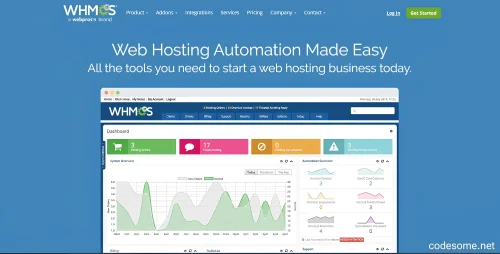
WHMCS (Web Hosting Management and Billing Platform) is a powerful and comprehensive software solution designed to streamline and automate the operations of web hosting providers, domain registrars, and other online service companies. It integrates essential business functions into a single, easy-to-use platform, enabling providers to deliver reliable services while reducing manual workload and increasing efficiency.
WHMCS is an all-in-one management system that combines billing, customer management, support, and automation tools tailored specifically for the web hosting industry. Its primary goal is to simplify complex operational processes, allowing service providers to focus on growth and customer satisfaction.
Features of WHMCS - Web Hosting Billing & Automation Platform
Automated Billing and Invoicing
Recurring billing and subscription management
Automated invoice generation and email notifications
Overdue payment reminders and late fee management
Tax calculation and multi-currency invoicing
Flexible billing cycles (monthly, quarterly, yearly, custom)
Customer Management
Secure client portal with login and account access
Customer registration, account creation, and management
Self-service account updates and profile management
Customer activity tracking and history
Service Provisioning & Automation
Automated provisioning of hosting accounts, domains, SSL certificates, email accounts, and more
Support for various control panels like cPanel, Plesk, DirectAdmin, etc.
One-click product/services setup
Automated suspensions and reactivations based on billing status
Domain Management
Domain registration, transfers, and renewals
Support for multiple domain registrars
Domain WHOIS management
Domain renewal reminders and automatic renewal options
Support Ticket System
Integrated customer support ticketing system
Ticket assignment, escalation, and internal notes
Email notifications for ticket updates
Knowledgebase and FAQ integrations
Payment Gateway Integrations
Support for multiple payment gateways (PayPal, Stripe, Authorize.Net, 2Checkout, and more)
Multiple currency support
Secure payment processing
Payment gateway customization options
Product & Service Management
Customizable product and service offerings
Flexible product configurations and pricing options
Bundled products and add-ons
Promotions and discount codes
Automation & Workflow Customization
Custom hooks and API for tailored automation
Scheduled tasks and cron job integrations
Automated email templates for various customer communications
Extensibility & Customization
Extensive API for third-party integrations
Modules and plugins marketplace
Customizable templates and themes
Developer-friendly hooks and events
Security & Compliance
Data encryption and secure login protocols
Role-based access controls
GDPR compliance tools
Regular updates and security patches
Multi-language & Multi-currency Support
Localization for multiple languages
Multi-currency invoicing and payments
Language packs and translation support
Reporting & Analytics
Sales and revenue reports
Customer activity and product performance reports
Financial summaries and tax reports
Custom report generation
Marketing & Customer Engagement
Coupon codes and discounts
Affiliate management system
Email marketing integrations
Automated follow-up emails
Reseller & Affiliate Management
Reseller account management
Affiliate tracking and commissions
Customizable affiliate programs
Reseller & Partner Features
Multiple reseller support
Custom reseller plans and discounts
Mobile Compatibility
Responsive client and admin interfaces
Mobile-friendly design for on-the-go management
Hosting & Server Management
Server monitoring integrations
Automated server provisioning and management
Support for multiple hosting platforms
Backup & Data Management
Automated backups
Data export and import tools
Localization & Language Packs
Support for various languages
Custom translations
Support & Community
Extensive documentation and tutorials
Active community forums
Professional support options
- 82 Downloads
Updated